Stop deleting API keys to rotate them
Replacing a personal API key by hand loses its settings, and deleting the old one breaks every client that still holds it; now it is one step, and the old key keeps working for up to 7 days.
We built Rotate key to make the replacement for you. The new key carries the old key's models, limits and permissions, and the old key keeps working for up to 1 hour, 1 day or 7 days, as you choose, or stops at once if you choose Now. With an overlap, your clients can switch without a gap.
To start, open API Keys in your settings, open the menu on the key's row and choose Rotate key.
Choose how long the old key keeps working
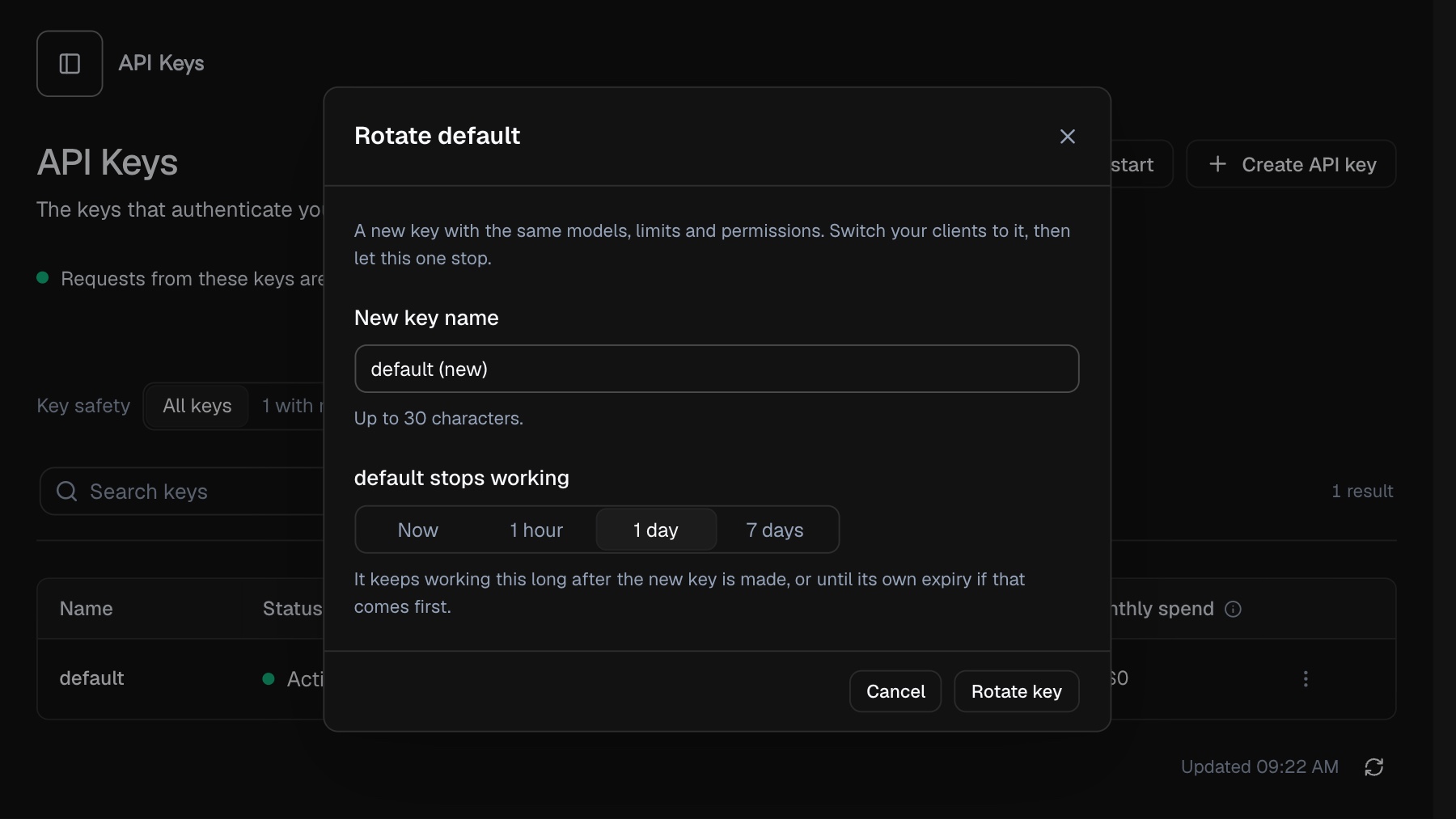
| Choice | old_key_expires_in | The old key |
|---|---|---|
| Now | 0 | is revoked in the same step, and requests with it are refused at once |
| 1 hour | 3600 | keeps working for 1 hour, then expires |
| 1 day (default) | 86400 | keeps working for 1 day, then expires |
| 7 days | 604800 | keeps working for 7 days, then expires |
If the old key already had an expiry that comes sooner, that earlier time stays. Until it stops, the old key keeps its name, its settings and its usage history. Choosing Now asks you to confirm first, because a revoked key cannot be enabled again (2.2.122).
What the new key copies
| New key | |
|---|---|
| Allowed models and IP allowlist | copied |
| Fallback models and timeout, compression settings | copied |
| Permission mode and restricted permissions | copied |
| Monthly limit and spend limit per hour | copied |
| Expiry | copied |
| Credit | starts with the credit the old key had left; unlimited stays unlimited |
| Usage counters | start at zero |
| Name | the one you give it, different from every key you have that is not revoked |
| Status | enabled, even when the old key was disabled |
While both keys work, they share the old key's one share of your account's monthly limit, so a key that holds the whole limit can still be rotated. Once the old key stops, it holds no share of it. The old key keeps its own credit until it stops.
The new key's secret is shown once, when it is made. Copy it before you close the dialog. Afterwards, unless you chose Now, the key list shows both keys, with the time the old one stops in its Expires column.
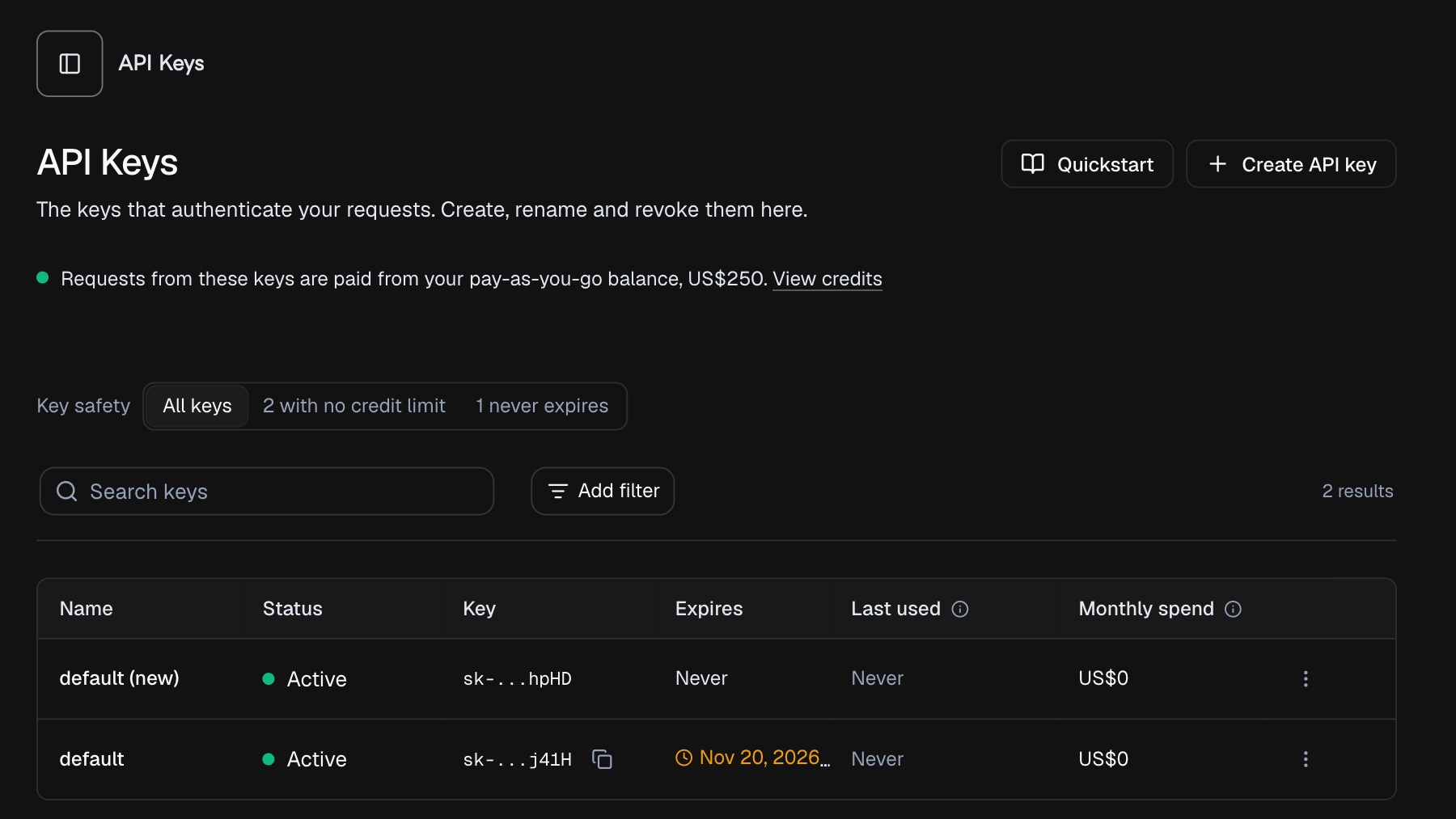
A rotation is written to your account's activity log.
The call the dashboard makes
Rotate key is one request. It is an account call, authenticated as you (your signed-in session or your account access token); an API key is not accepted.
POST /api/token/{id}/rotate
Content-Type: application/json

{"name": "default (new)", "old_key_expires_in": 86400}| Field | Type | |
|---|---|---|
name | string | required; the new key's name, 1 to 30 characters |
old_key_expires_in | integer | optional; 0, 3600, 86400 or 604800 seconds, 86400 when omitted |
The response is sent with Cache-Control: no-store. data is the new key in the shape the key list uses, with more fields, including its permissions and limits (not shown here), plus key, the full secret, which no later response returns:
{
  "success": true,
  "message": "",
  "data": {
    "id": 4182,
    "tracking_id": "key_4182",
    "name": "default (new)",
    "key": "sk-apx_<46 characters>",
    "key_masked": "sk-...a9Zq",
    "secret_viewable": false,
    "status": "active",
    "expires_at": null
  }
}
A refused rotation changes nothing: no key is made and the old key is untouched. Refusals from the rotation itself use one envelope, {"success": false, "code": "...", "message": "..."}:
| Status | code | When |
|---|---|---|
| 400 | invalid_id | the id in the path is not a positive integer |
| 400 | invalid_request | the body is not valid JSON |
| 400 | name_required | name is missing |
| 400 | invalid_name | the name is blank or longer than 30 characters |
| 400 | invalid_old_key_expires_in | the value is not one of the four |
| 400 | invalid_monthly_limit | the new key's monthly limit does not fit your account's monthly limit |
| 404 | not_found | no key of yours has that id; an organization's key answers the same |
| 409 | name_taken | a key of yours that is not revoked already has that name, the old key's own name included |
| 409 | token_revoked | the key is revoked |
| 409 | token_expired | the key has expired |
| 409 | token_changed | the key's monthly limit changed while it was being rotated; try again |
| 403 | subscription_token | the key belongs to a subscription plan |
| 403 | email_change_cooldown | the account's email address was changed a short while ago |
A request from a session that must confirm its sign-in first is refused with 401 fresh_auth_required. Requests over the rate limit answer 429.
Also in this entry
Every key you create is shown once. A key you create now is shown in full when it is created or rotated, and not again. After that the key list shows sk-... and its last four characters, and a request to reveal it answers 409 secret_not_viewable. A key made before this change can still be copied from its row after you confirm your sign-in, and the default key made at sign-up and your subscription plan key stay viewable.
A monthly ceiling for auto-reload. In Credits, the auto-reload settings have a new field, Monthly limit (optional), in US$. It is empty by default, which means no limit, and when set it must be at least the reload amount. When the reloads already made in a calendar month (UTC) plus the next one would pass it, that reload is skipped and no charge is attempted. Reloads start again with the next month.
Per-key spend limits have their own entry: see "Set limits that bound a leak" in 2.2.122. A rotated key keeps its spend limit per hour, monthly limit, allowed models and IP allowlist; its credit limit is what the old key had left.